How to Use Zod with Angular Signal Forms (Step-by-Step Migration)
You've got a form working perfectly with Reactive Forms and Zod validation, but after migrating to Signal Forms, your validation stops working. Forms submit even when invalid, and error messages disappear. The problem? Signal Forms use a completely different validation API than Reactive Forms. Angular's validateTree() function bridges this gap by translating Zod's error map into Signal Forms' validation format. This lets you keep centralized Zod schemas while still leveraging Signal Forms’ reactive state management. This step-by-step tutorial shows exactly how to wire Zod validation into Angular Signal Forms.
Angular Signal Forms Tutorial Series:
- Migrate to Signal Forms - Start here for migration basics
- Signal Forms vs Reactive Forms - See why Signal Forms are better
- Custom Validators - Add custom validation to Signal Forms
- Async Validation - Handle async validation in Signal Forms
- Cross-Field Validation - Validate across multiple fields
- State Classes - Use automatic state classes
The Problem: Zod Validation Needs to Be Re-Integrated After Signal Forms Migration
Many developers encounter this exact issue: you have a form working perfectly with Reactive Forms and Zod validation, but once you migrate to Signal Forms, you’re not sure how to get Zod validation working again.
Without validation, the form submits even when fields are invalid, and error messages disappear.
Zod needs to be re-integrated using Signal Forms’ validation system.
Let’s start by understanding what we’re working with, then we’ll migrate it properly.
What Is Zod? Why Angular Developers Use It for Validation
If you’re new to Zod like me, here’s what you need to know…
Zod is a TypeScript-first schema validation library that lets you define the shape of your data once, and it validates that data at runtime with clean, human-readable error messages.
It’s extremely popular in React, Node.js, and full-stack TypeScript applications because it provides:
- Type safety: Your TypeScript types stay in sync with your validation schema
- Runtime validation: Catches errors that TypeScript can’t catch at compile time
- Clean error messages: Human-readable validation errors out of the box
- Composable schemas: Build complex validation rules from simple building blocks
For Angular developers, Zod offers a way to centralize validation logic outside of Angular’s form system, making it easier to share validation rules between frontend and backend, or reuse schemas across different parts of your application.
Since Zod is an external package, you install it like any other npm package:
npm install zod
But in our case, we already have it installed, so let’s jump straight into the code.
Understanding the Zod Schema for Angular Form Validation
Let’s start by examining our form schema file.
First we import the z object from the zod package:
import { z } from 'zod';
This gives us access to the z object, which is the main API for creating Zod schemas.
Then we define our SignupModel type:
export type SignupModel = z.infer<typeof signupSchema>;
This keeps our TypeScript type perfectly synchronized with the schema.
If you change the schema, the type updates automatically.
Next is the ZodErrorMap type:
export type ZodErrorMap = Record<string, string[]>;
This describes the shape of our errors object.
Each field name maps to an array of error messages.
And this is what we’ll display in the UI.
Next is the signupSchema object:
export const signupSchema = z.object({
    username: z
        .string()
        .min(3, 'Username must be at least 3 characters long')
        .regex(
            /^[a-zA-Z0-9_]+$/,
            'Only letters, numbers, and underscores are allowed'
        ),
    email: z
        .string()
        .email('Please enter a valid email address'),
});
This defines our validation rules:
- Username must be at least 3 characters
- Username must match an alphanumeric pattern (letters, numbers, underscores)
- Email must be a valid email address
And finally, we have the validateSignup function:
export function validateSignup(value: SignupModel) {
    const result = signupSchema.safeParse(value);

    if (result.success) {
        return {
            success: true as const,
            data: result.data,
            errors: {} as ZodErrorMap,
        };
    }

    const errors = result.error.issues.reduce<ZodErrorMap>(
        (acc, issue) => {
            const field = issue.path[0]?.toString() ?? '_form';
            (acc[field] ??= []).push(issue.message);
            return acc;
        }, {}
    );

    return {
        success: false as const,
        data: null,
        errors,
    };
}
This function uses safeParse instead of parse (which throws). It returns either:
success: truewith validated datasuccess: falsewith a clean error map
That error map is exactly what we’ll display in the UI and integrate with Signal Forms.
How Zod Is Wired into Angular Reactive Forms (Before Migration)
Let’s look at how this was wired up with Reactive Forms.
First, on the form element we’re binding to our form using the formGroup directive and the ngSubmit event:
<form [formGroup]="form" (ngSubmit)="onSubmit()" novalidate>
The formGroup directive binds to our Reactive Form.
The ngSubmit event calls the onSubmit method when the form is submitted.
And we’re setting novalidate to prevent the browser from validating the form.
Next, we’re using the formControlName directive to connect the username input to a form control:
<input type="text" formControlName="username" />
Below this, we’re using the getZodErrors() method to get the Zod errors for the username field:
@let usernameErrors = getZodErrors('username');
This gives us an array of error messages for the username field.
If there are errors, and if the username field has been touched, we’re looping through the errors and displaying them:
@if (usernameErrors.length && form.controls.username.touched) {
    <ul class="error-list">
        @for (err of usernameErrors; track $index) {
            <li>{{ err }}</li>
        }
    </ul>
}
And we follow the exact same pattern for the email field.
<input type="email" formControlName="email" />

@let emailErrors = getZodErrors('email');
@if (emailErrors.length && form.controls.email.touched) {
    <ul class="error-list">
        @for (err of emailErrors; track $index) {
            <li>{{ err }}</li>
        }
    </ul>
}
The Component TypeScript: Reactive Forms Approach
Now let’s see the component TypeScript.
First, we have a zodErrors object that stores all validation messages from Zod:
import { ..., ZodErrorMap } from './form.schema';

zodErrors: ZodErrorMap = {};
Then we use the FormBuilder to create our form:
import { ..., inject } from '@angular/core';
import { ..., FormBuilder } from '@angular/forms';

private fb = inject(FormBuilder)
readonly form = this.fb.nonNullable.group({
    username: [''],
    email: [''],
});
This creates a form group with two controls, one for the username and one for the email.
Next, in the constructor we run Zod validation once on initialization:
import { ..., SignupModel } from './form.schema';

constructor() {
    this.runZodValidation(this.form.getRawValue() as SignupModel);
}
This calls the runZodValidation function, which runs Zod validation on the form’s initial value.
After this, we monitor the form’s value changes and run Zod validation on every keystroke:
import { takeUntilDestroyed } from '@angular/core/rxjs-interop';

constructor() {
    ...
    this.form.valueChanges
      .pipe(takeUntilDestroyed())
      .subscribe(() =>
            this.runZodValidation(this.form.getRawValue() as SignupModel));
}
Next up, we have the runZodValidation function:
private runZodValidation(value: SignupModel): void {
    const result = validateSignup(value);
    this.zodErrors = result.errors;
}
This function calls the validateSignup function from our schema, which runs Zod validation on the form’s value and stores the errors in our zodErrors object.
After this, we have the getZodErrors helper method that we just saw in the template:
protected getZodErrors(controlName: keyof SignupModel): string[] {
    return this.zodErrors[controlName] ?? [];
}
This returns the error messages for the given field.
And finally, we have the onSubmit method:
protected onSubmit() {
    const rawValue = this.form.getRawValue() as SignupModel;
    const result = validateSignup(rawValue);
		this.zodErrors = result.errors;
}
This validates our form value one more time before submitting.
All of this works perfectly with Reactive Forms, but what happens when we migrate to Signal Forms?
Migrated to Signal Forms: Zod Validation Needs to Be Re-Integrated
After migrating to Signal Forms, the form looks identical visually, but validation needs to be re-integrated:

- Click and blur the username field → No validation errors
- Click and blur the email field → No validation errors
- Click submit → Form submits even when invalid
The UI looks fine, but validation and submission are broken.
This is exactly the problem we’re going to fix.
Let’s see what changed.
Angular Signal Forms Template Breakdown: The [field] Directive
The form schema hasn’t changed, so let’s look at the new template.
First, we no longer have the formGroup directive, so we’re not binding to our form anymore:
<form (ngSubmit)="onSubmit()" novalidate>
Next, we’re using the new field directive to connect the username input to our form’s username field:
<input type="text" [field]="form.username" />
This connects the input directly to a Field object from our Signal Form.
Then, we have a similar setup for the error validation messages but we’re using the signal forms equivalent now:
@let username = form.username();
@if (username.touched() && username.invalid()) {
    <ul class="error-list">
        @for (err of username.errors(); track $index) {
            <li>{{ err.message }}</li>
        }
    </ul>
}
Notice we’re no longer using getZodErrors().
We won’t need this helper method anymore because the errors will come from field.errors(), not a separate Zod error map.
Now let’s see the component TypeScript.
Angular Signal Forms Logic Breakdown: model and submit()
First, we have our “model” signal:
import { ..., signal } from '@angular/core';
import { ..., SignupModel } from './form.schema';

protected model = signal<SignupModel>({
    username: '',
    email: '',
});
This essentially replaces FormGroup’s value object.
It’s also the single source of truth for the form’s data.
Next, we have our form signal created with the form() function:
import { ..., form } from '@angular/forms/signals';

protected readonly form = form(this.model);
This creates a form signal wrapped around our model signal.
And finally, we’ve updated our onSubmit method to use the new submit() method:
protected onSubmit(event: Event): void {
    event.preventDefault();

    submit(this.form, async () => {
        const value = this.model();
        console.log('Submitted data (Zod-valid):', value);
    });
}
This only executes if the form is valid.
No manual validity checks needed.
Currently, our form is valid because we’re not doing any validation yet.
The UI is now Signal Forms native, but we still need to plug Zod back in.
That’s where validateTree() comes in.
How to Wire Zod into Angular Signal Forms with validateTree()
Signal Forms provides validateTree() to integrate external validation libraries.
Here’s how to wire Zod back in.
The validateTree() Function
First, we add a second parameter to our form() function that passes the schema context to the validation callback:
protected readonly form = form(this.model, s => {
    ...
});
This gives us access to all form fields and will execute whenever the form state changes.
Within this callback, we’re going to use the validateTree() function to validate our form.
import { ..., validateTree } from '@angular/forms/signals';

protected readonly form = form(this.model, s => {
    validateTree(s, ctx => {
        ...
    });
});
The first parameter is the form schema, and the second parameter is the validation callback that provides access to the context of the form.
Our first step is to run the form value through Zod validation:
const result = validateSignup(ctx.value());
If the validation is successful, we’ll return undefined:
if (result.success) {
    return undefined;
}
This tells Angular that there are no errors.
But if there are errors, we need to return them in a format that Signal Forms can understand.
Translating Zod Errors to Signal Forms Format
First, we’ll store the Zod errors in a variable:
import { ..., ZodErrorMap } from './form.schema';

const zodErrors: ZodErrorMap = result.errors;
Then we’ll create an array to store a collection of Signal Forms validation errors:
import { ..., ValidationError } from '@angular/forms/signals';

const errors: ValidationError.WithOptionalField[] = [];
The ValidationError type is a union of all possible validation error types.
In our case, we’re only interested in the WithOptionalField type, which is a validation error that can have an optional field.
Now we need to translate Zod’s error map into Signal Forms’ ValidationErrorArray format.
Conceptually, Signal Forms expects a ValidationErrorArray that looks like this:
type ValidationErrorArray = Array<{
  kind: string;    // Error type identifier
  message: string; // Human-readable error message
  field: Field;    // Reference to the field this error belongs to
}>;
Each error needs:
kind: A unique identifier for the error type (we’re using the Zod field key)message: The error message from Zodfield: A reference to the Signal Forms field object
The Field Reference Helper
We need to map Zod’s field names (strings) to Signal Forms field objects:
const getFieldRef = (key: string) => {
    switch (key) {
        case 'username':
            return ctx.field.username;
        case 'email':
            return ctx.field.email;
        default:
            return null;
    }
};
This connects Zod’s string-based field names to Signal Forms’ field references.
Error Transformation Loop
Finally, we loop through Zod’s errors and transform them:
for (const [fieldKey, messages] of Object.entries(zodErrors)) {
    const fieldRef = getFieldRef(fieldKey);
    if (fieldRef) {
        errors.push(
            ...messages.map((message) => ({
                kind: `zod.${fieldKey}` as const,
                message,
                field: fieldRef,
            }))
        );
    }
}
This creates one ValidationErrorArray entry per Zod error message, properly linked to the correct Signal Forms field.
And after all of this, we need to return the errors array:
return errors.length ? errors : undefined;
The entire thing looks like this in the end:
protected readonly form = form(this.model, s => {
    validateTree(s, ctx => {
        const result = validateSignup(ctx.value());

        if (result.success) {
            return undefined;
        }

        const zodErrors: ZodErrorMap = result.errors;
        const errors: ValidationError.WithOptionalField[] = [];

        const getFieldRef = (key: string) => {
            switch (key) {
                case 'username':
                    return ctx.field.username;
                case 'email':
                    return ctx.field.email;
                default:
                    return null;
            }
        };

        for (const [fieldKey, messages] of Object.entries(zodErrors)) {
            const fieldRef = getFieldRef(fieldKey);
            if (fieldRef) {
                errors.push(
                    ...messages.map((message) => ({
                        kind: `zod.${fieldKey}` as const,
                        message,
                        field: fieldRef,
                    }))
                );
            }
        }

        return errors.length ? errors : undefined;
    });
});
And that’s it! We’ve successfully wired Zod into Angular Signal Forms!
Final Test: Zod Validation Working with Angular Signal Forms
After wiring everything together, let’s test it!
When click and blur username:
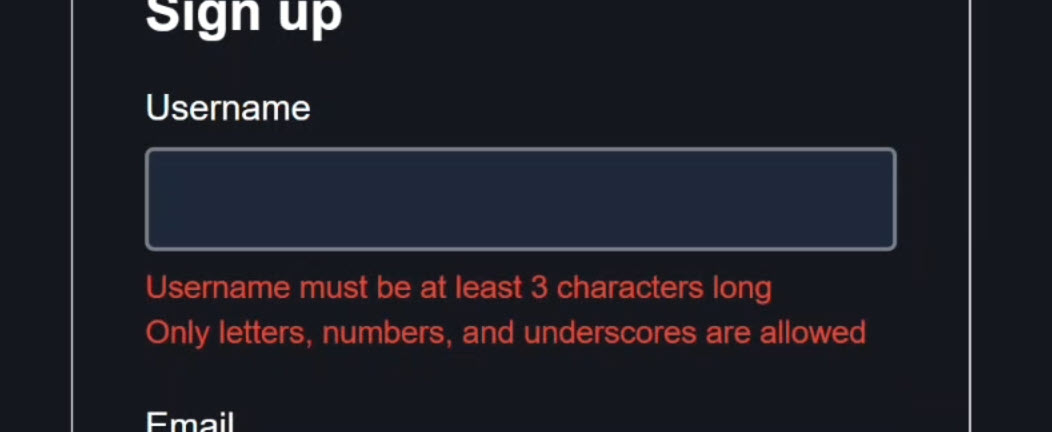
The validation errors appear again!
When we click and blur email:

The validation error appears again!
Also, while the form is invalid, when we click submit, the form doesn’t submit because submit() only runs when the form is valid.
Then, when we enter valid username and email:
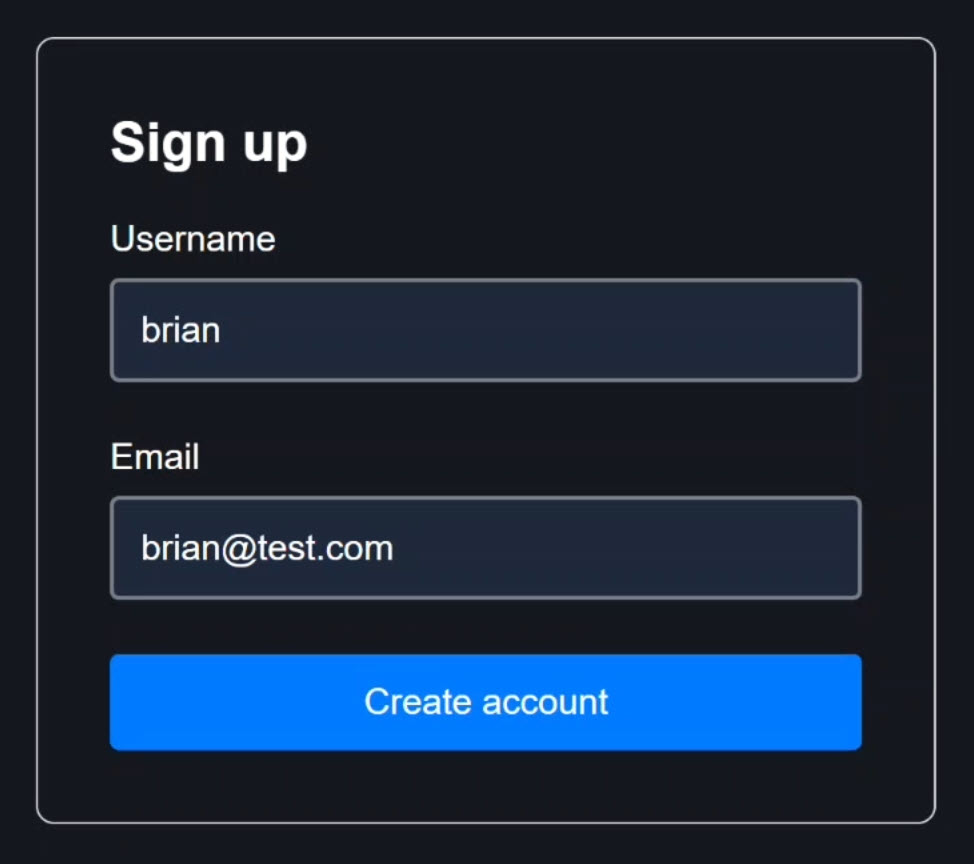
The errors disappear and the form becomes valid.
And now when we click submit, the form submits successfully because it’s now valid!
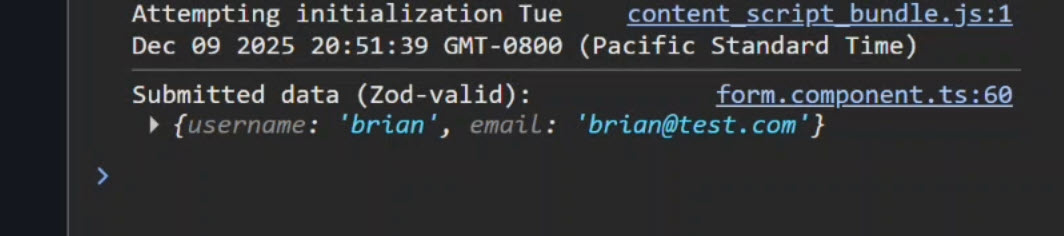
Everything works perfectly now.
Zod owns the validation rules, Signal Forms owns the UI state, and they’re fully integrated.
Final Thoughts: Zod + Angular Signal Forms Without FormGroup
You now have the best of both worlds:
- Zod owns validation rules: Centralized, reusable, type-safe schemas
- Signal Forms owns UI state: Reactive, performant, modern Angular
- No FormGroup: No need for the old Reactive Forms API
- No
formControlName: Using the new[field]directive - No duplicated validation logic: Single source of truth in Zod
This integration pattern works with any external validation library, not just Zod.
The key is using validateTree() to translate your validation library’s error format into Signal Forms’ ValidationErrorArray format.
If this helped you, be sure to subscribe and leave a comment, it really helps other Angular developers find this content.
Additional Resources
- The Reactive Forms demo app BEFORE any changes
- The Signal Forms demo app BEFORE any changes
- The Signal Forms demo app AFTER making changes
- Angular Signal Forms Documentation
- Signal Forms Validation API
- Zod Documentation
- My course “Angular: Styling Applications”
- My course “Angular in Practice: Zoneless Change Detection”
- Get a Pluralsight FREE TRIAL HERE!
Try It Yourself
Want to experiment with Zod validation in Signal Forms? The integration is straightforward once you understand how validateTree() works.
If you have any questions or spot improvements to this approach, please leave a comment.
I genuinely want this to be correct and production-ready!