Angular’s New injectAsync() API Explained
Angular v22 just made lazy-loading services much simpler. In this post, we'll explore how to leverage the new injectAsync() API to reduce your main bundle size and replace awkward lazy-loading workarounds. We’ll compare the older manual lazy-loading approach with Angular v22’s new injectAsync() API and see why the new pattern feels simpler and easier to reason about.
The Problem: Libraries Loading Too Early
When building Angular applications, it’s common to include third-party libraries for various functionalities.
However, if these libraries are not loaded efficiently, they can increase your initial bundle size, leading to slower application startup times.
In our demo application, we’re using highlight.js and Marked for markdown processing and syntax highlighting.
In this case, the post-editor component itself is needed immediately, but the markdown-processing dependency isn’t.
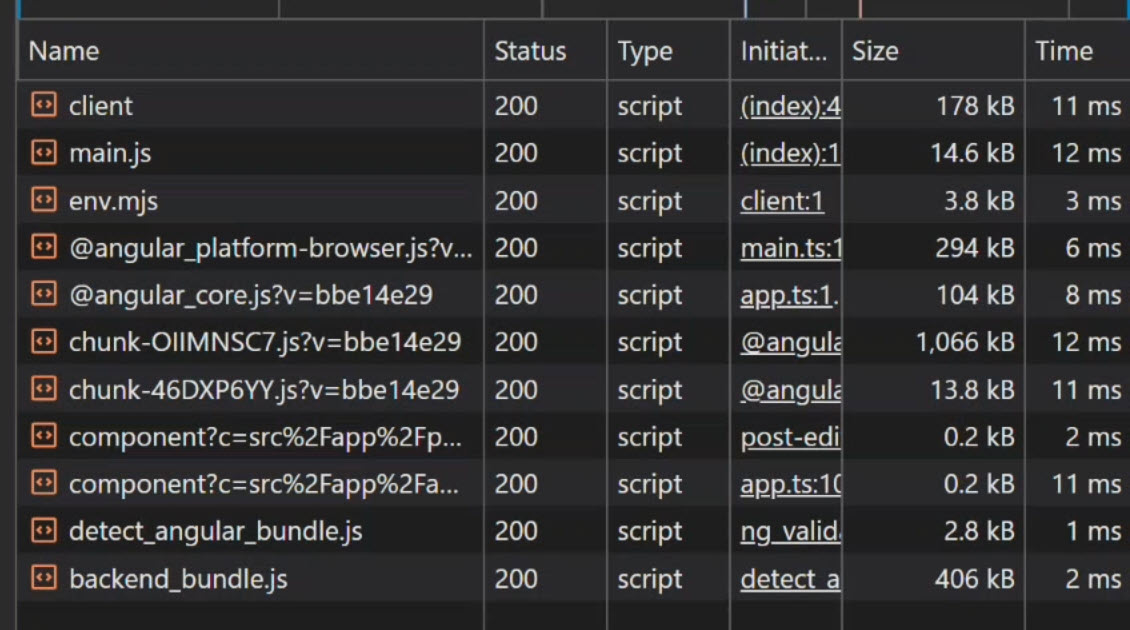
Even though the feature might not be immediately needed by the user, these libraries are loaded upfront, contributing to a 17.2kb main bundle:
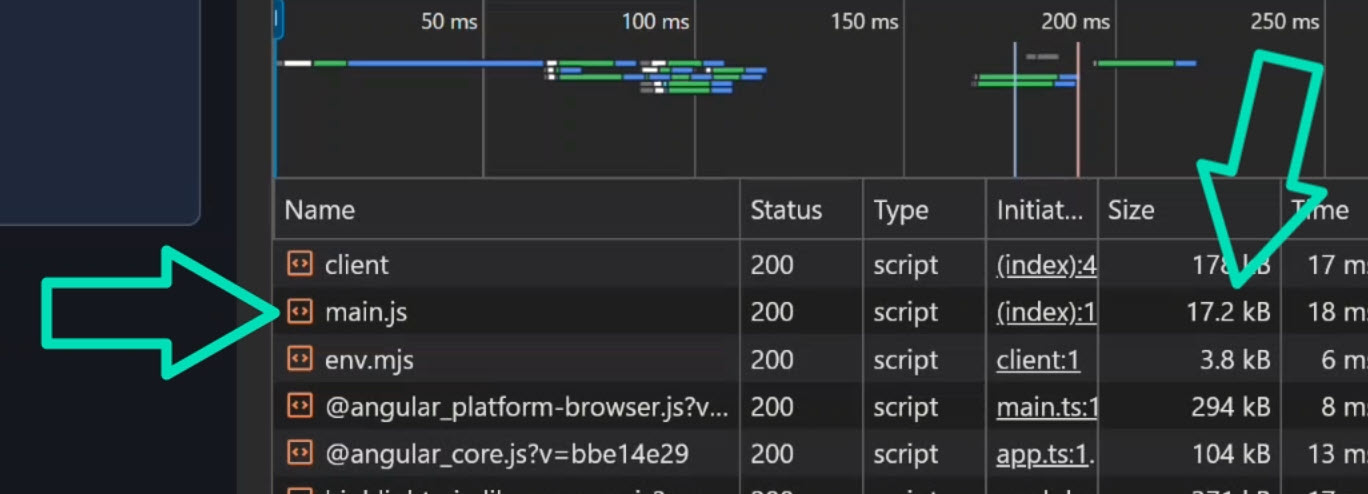
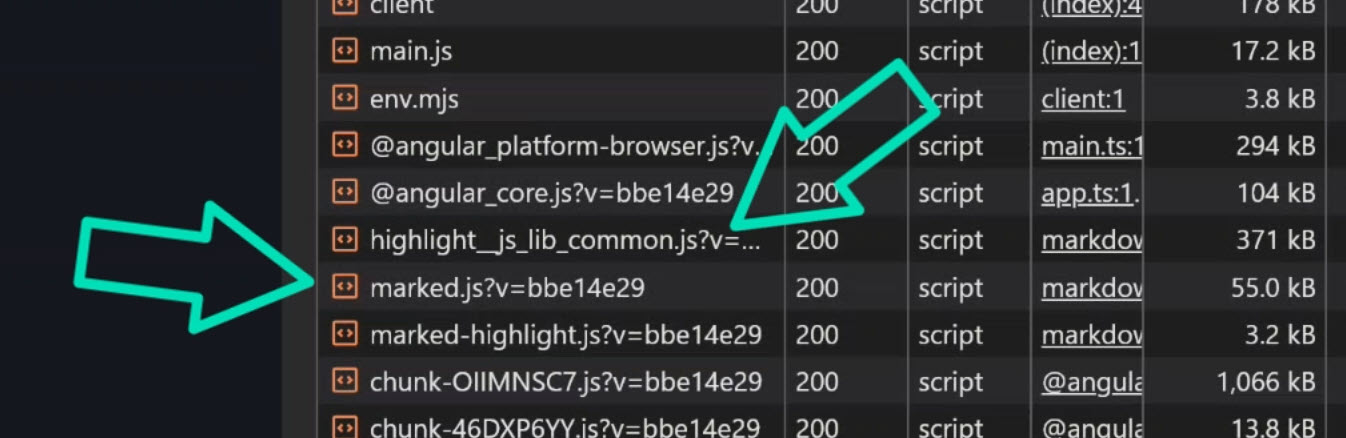
This eager loading means users are paying for code they might never use, impacting performance.
Understanding the Markdown Service and its Eager Usage
Our demo application features a MarkdownService responsible for converting markdown content into HTML with syntax highlighting.
This service leverages marked, marked-highlight, and highlight.js to achieve this functionality:
import { Service } from '@angular/core';
import hljs from 'highlight.js/lib/common';
import { Marked } from 'marked';
import { markedHighlight } from 'marked-highlight';

@Service()
export class MarkdownService {
  private readonly marked = new Marked(
    markedHighlight({
      emptyLangClass: 'hljs',
      langPrefix: 'hljs language-',
      highlight(code, lang) {
        const language = hljs.getLanguage(lang) ? lang : 'plaintext';

        return hljs.highlight(code, { language }).value;
      },
    })
  );

  render(content: string): string {
    return this.marked.parse(content, { async: false });
  }
}
The core issue arises from how this service is consumed.
Initially, the post-editor component directly injects the MarkdownService:
import { Component, inject, signal } from '@angular/core';
import { MarkdownService } from '../markdown.service';

@Component({
  selector: 'app-post-editor',
  templateUrl: './post-editor.component.html',
  styleUrls: ['./post-editor.component.css'],
})
export class PostEditorComponent {
  protected readonly content = signal('');
  protected readonly previewHtml = signal('');
  private markdownService = inject(MarkdownService);

  preview() {
    this.previewHtml.set(this.markdownService.render(this.content()));
  }
}
Because the MarkdownService is statically imported and injected into PostEditorComponent, Angular includes it and all its dependencies (marked, highlight.js) in the initial application bundle.
This happens regardless of whether the user has interacted with the markdown preview feature, leading to unnecessary upfront loading and a larger initial bundle size.
This is the “problem” we aim to solve with lazy loading.
The Old Way: Manually Lazy Loading an Angular Service
Historically, addressing eager loading for services involved a fair amount of manual setup.
To lazy load the MarkdownService and its dependencies, we would typically inject Angular’s Injector and dynamically import the service.
It might look something like this:
import { Component, inject, Injector, signal } from '@angular/core';

@Component({
  selector: 'app-post-editor',
  templateUrl: './post-editor.component.html',
  styleUrls: ['./post-editor.component.css'],
})
export class PostEditorComponent {
  protected readonly content = signal('');
  protected readonly previewHtml = signal('');
  private readonly injector = inject(Injector);
  private markdownServicePromise: Promise<MarkdownService> | null = null;

  async preview() {
    this.markdownServicePromise ??= import('../markdown.service').then(m =>
      this.injector.get(m.MarkdownService)
    );

    const markdownService = await this.markdownServicePromise;
    this.previewHtml.set(markdownService.render(this.content()));
  }
}
This approach solves the problem.
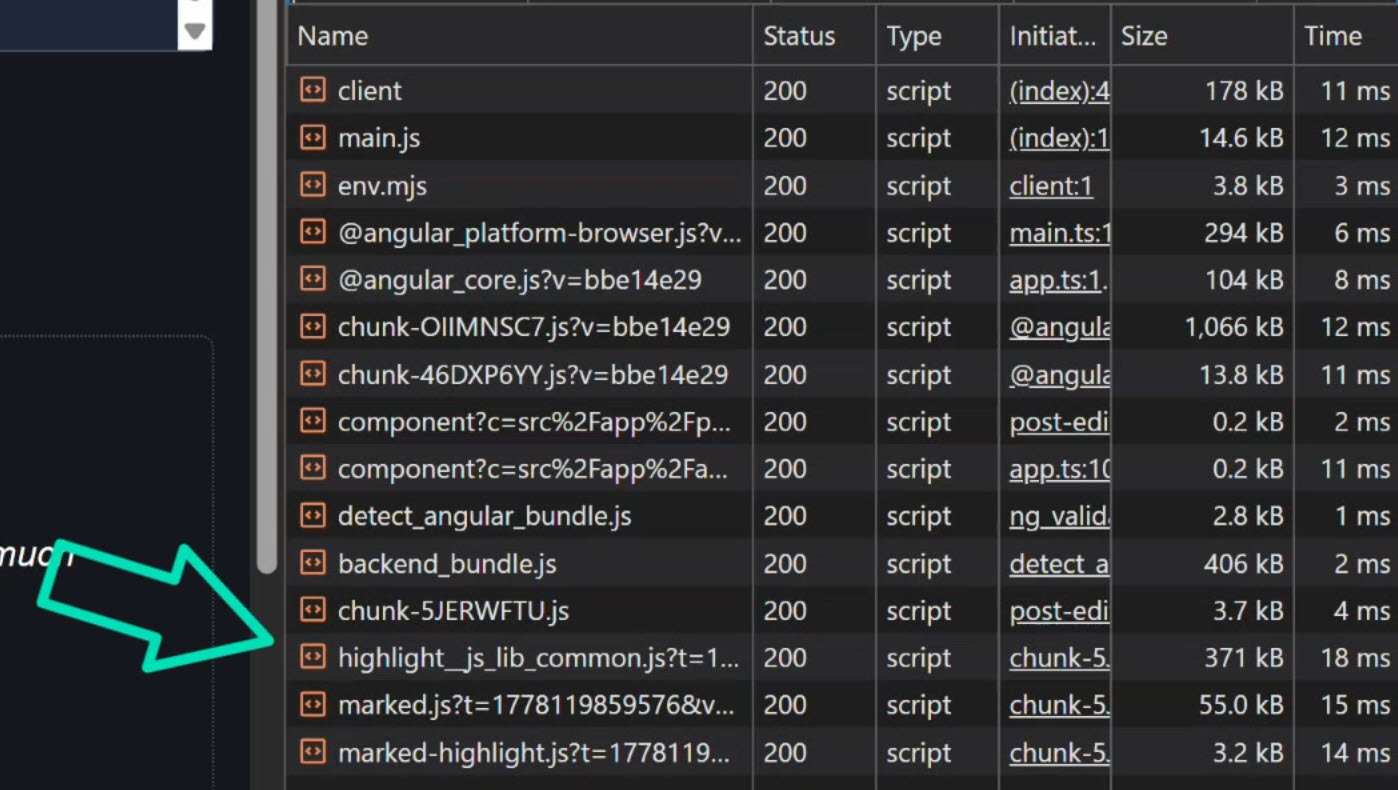
The bundle size is reduced, and highlight.js and marked are no longer part of the initial page load:
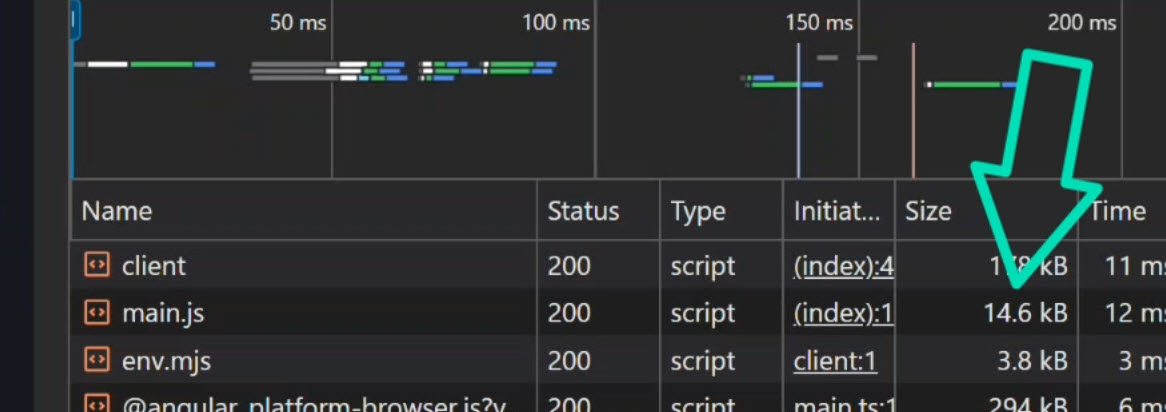
They are now dynamically loaded only when the preview() method is called:
However, this manual lazy loading introduces a lot of setup, making it less ergonomic and harder to maintain.
The New Way: Replacing Boilerplate with injectAsync()
Angular v22 introduces injectAsync(), a new API that simplifies lazy loading services.
This function handles much of the orchestration we previously had to manage ourselves.
To refactor our post-editor component using injectAsync(), we can remove the Injector and the markdownServicePromise:
import { Component, injectAsync, onIdle, signal } from '@angular/core';

@Component({
  selector: 'app-post-editor',
  templateUrl: './post-editor.component.html',
  styleUrls: ['./post-editor.component.css'],
})
export class PostEditorComponent {
  protected readonly content = signal('');
  protected readonly previewHtml = signal('');

  private markdownService = injectAsync(
    () => import('../markdown.service').then(m => m.MarkdownService)
  );

  async preview() {
    const svc = await this.markdownService();
    this.previewHtml.set(svc.render(this.content()));
  }
}
With injectAsync(), we pass a loader function that dynamically imports the service.
Angular automatically captures the current injection context, resolves the service through dependency injection, and caches the result.
This makes the implementation simpler and easier to reason about.
Prefetch Lazy Dependencies with onIdle
injectAsync() also offers a prefetch option, allowing us to load dependencies early, but without blocking the initial bundle:
import { ..., onIdle } from '@angular/core';

private markdownService = injectAsync(
  () => import('../markdown.service').then(m => m.MarkdownService),
  { prefetch: onIdle }
);
By setting prefetch: onIdle, Angular will begin loading the dependency quietly in the background once the browser becomes idle.
This means the feature stays out of the initial bundle, but the user might never notice a loading delay because the service is already prefetched by the time they need it.
The Final Result
The application continues to function exactly as before, but with an optimized loading strategy.
The initial bundle size is smaller, and the markdown libraries are lazy-loaded, either on demand or prefetched during browser idle time.
This makes the pattern much more practical for real-world applications.
Get Ahead of Angular’s Next Shift
Angular’s newest APIs are changing the way we build.
If you’re ready to go deeper with one of the biggest shifts in modern Angular, my Signal Forms course will help you get comfortable with the new forms model.
You can access it either directly or through YouTube membership, whichever works best for you:
👉 Buy the course
👉 Get it with YouTube membership