Angular 22 hostDirectives De-Duplication Explained
Host directives are a great way to compose reusable behavior in Angular, but they had one frustrating edge case: two directives could not safely reuse the same shared host directive on the same element. In this post, we'll build a copy button with tooltip behavior, press feedback, and clipboard support, then look at how Angular 22 now de-duplicates shared host directives so this kind of composition works the way you'd expect.
The Problem: Shared Behavior Can Collide
In this demo, we have a simple invite link with a button beside it:
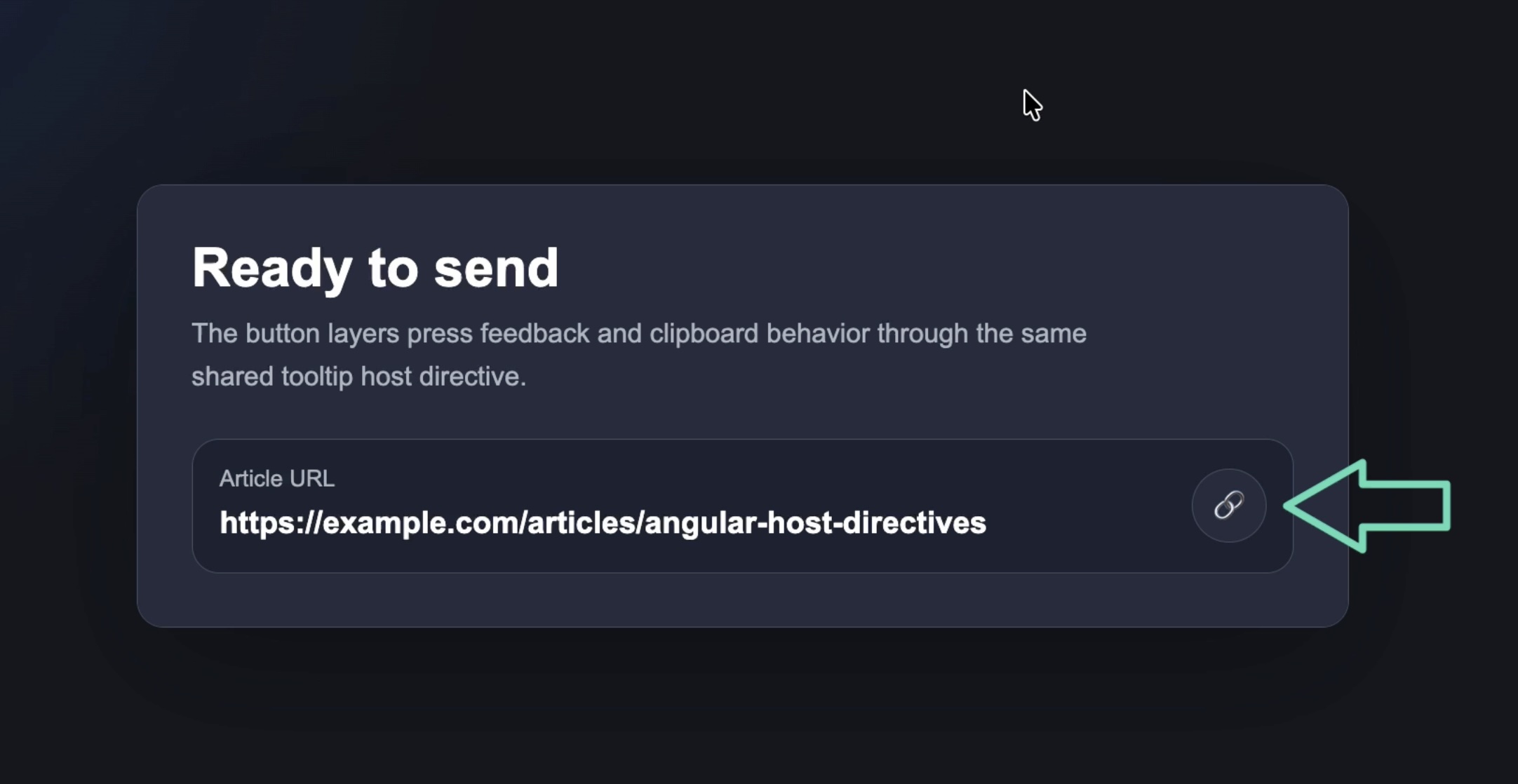
The button needs three behaviors:
- On hover, show a tooltip that says “Copy invite link”
- On press, temporarily change the message to “Release to copy”
- After copying, show “Copied!”
This is exactly the kind of thing the Directive Composition API is good at.
Instead of creating one large directive that handles everything, we can split the behavior into smaller directives:
- A shared tooltip directive
- A copy button directive
- A pressable directive
That keeps each directive focused, reusable, and easier to reason about.
But before Angular 22, this setup could break when more than one directive reused the same shared host directive.
Creating the Shared Tooltip Directive
Let’s start with the shared tooltip behavior.
This directive owns the tooltip message, host attributes, and temporary message state:
import {
  computed,
  DestroyRef,
  Directive,
  inject,
  input,
  signal,
} from '@angular/core';

@Directive({
  selector: '[appTooltip]',
  host: {
    class: 'has-tooltip',
    '[attr.aria-label]': 'visibleMessage()',
    '[attr.data-tooltip]': 'visibleMessage()',
    '[class.show-tooltip]': 'showingTemporaryMessage()',
  },
})
export class TooltipDirective {
  readonly message = input.required<string>();
  private readonly destroyRef = inject(DestroyRef);
  private readonly temporaryMessage = signal<string | null>(null);
  private timeoutId: ReturnType<typeof setTimeout> | null = null;

  constructor() {
    this.destroyRef.onDestroy(() => this.clearTimeout());
  }

  protected readonly showingTemporaryMessage = computed(() => {
    return this.temporaryMessage() !== null;
  });

  protected readonly visibleMessage = computed(() => {
    return this.temporaryMessage() ?? this.message();
  });

  showMessage(message: string): void {
    this.clearTimeout();
    this.temporaryMessage.set(message);
  }

  clearMessage(): void {
    this.clearTimeout();
    this.temporaryMessage.set(null);
  }

  showTemporaryMessage(message: string, duration = 1200): void {
    this.showMessage(message);

    this.timeoutId = setTimeout(() => {
      this.temporaryMessage.set(null);
      this.timeoutId = null;
    }, duration);
  }

  private clearTimeout(): void {
    if (this.timeoutId !== null) {
      clearTimeout(this.timeoutId);
      this.timeoutId = null;
    }
  }
}
There are a few important details here.
The directive has a required message input using Angular’s input() API.
It also adds several host bindings:
host: {
  class: 'has-tooltip',
  '[attr.aria-label]': 'visibleMessage()',
  '[attr.data-tooltip]': 'visibleMessage()',
  '[class.show-tooltip]': 'showingTemporaryMessage()',
}
The aria-label gives the button an accessible name.
The data-tooltip attribute gives the CSS text to render via the attr() function.
And show-tooltip lets us force the tooltip to appear when a temporary message is being shown.
The key point is that this directive does not know anything about copying text or press states.
It only owns tooltip behavior.
Composing Tooltip Behavior Into a Copy Button
Next, we have a directive for the copy behavior:
import { Directive, inject, input } from '@angular/core';
import { TooltipDirective } from './tooltip';

@Directive({
  selector: '[appCopyButton]',
  hostDirectives: [
    {
      directive: TooltipDirective,
      inputs: ['message: tooltip'],
    },
  ],
  host: {
    '(click)': 'copy()',
  },
})
export class CopyButtonDirective {
  readonly copyText = input.required<string>();
  readonly copiedMessage = input.required<string>();
  readonly copyFailedMessage = input.required<string>();
  readonly copiedDuration = input(2500);
  private readonly tooltip = inject(TooltipDirective);

  protected async copy(): Promise<void> {
    try {
      await navigator.clipboard.writeText(this.copyText());
      this.tooltip.showTemporaryMessage(this.copiedMessage(), this.copiedDuration());
    } catch {
      this.tooltip.showTemporaryMessage(
        this.copyFailedMessage(),
        this.copiedDuration()
      );
    }
  }
}
This directive composes the TooltipDirective using hostDirectives:
hostDirectives: [
  {
    directive: TooltipDirective,
    inputs: ['message: tooltip'],
  },
],
That means when appCopyButton is applied to an element, Angular also applies the tooltip behavior to that same host element.
The directive also exposes the tooltip directive’s message input as tooltip.
So instead of writing this:
<button appTooltip message="Copy invite link"></button>
We can expose a more purposeful API through the copy directive:
<button appCopyButton tooltip="Copy invite link"></button>
Then, when the button is clicked, the directive writes the text to the clipboard using the Clipboard API.
If it works, it temporarily shows the copied message.
If it fails, it shows the failed message.
Reusing the Same Tooltip in a Pressable Directive
Now let’s add a second behavior directive.
This one handles the pressed state:
import { Directive, inject, input, signal } from '@angular/core';
import { TooltipDirective } from './tooltip';

@Directive({
  selector: '[appPressable]',
  hostDirectives: [
    {
      directive: TooltipDirective,
      inputs: ['message: tooltip'],
    },
  ],
  host: {
    '(pointerdown)': 'press()',
    '(pointerup)': 'release()',
    '(pointerleave)': 'release()',
    '(blur)': 'release()',
    '[class.is-pressed]': 'isPressed()',
  },
})
export class PressableDirective {
  readonly pressedMessage = input.required<string>();
  protected readonly isPressed = signal(false);
  private readonly tooltip = inject(TooltipDirective);

  protected press() {
    this.isPressed.set(true);
    this.tooltip.showMessage(this.pressedMessage());
  }

  protected release() {
    this.isPressed.set(false);
    this.tooltip.clearMessage();
  }
}
This directive also composes the same TooltipDirective.
When the user presses the button, it sets the pressed state and updates the tooltip message.
When the user releases, leaves, or blurs the button, it clears the temporary message.
So now we have two higher-level behavior directives:
CopyButtonDirective
  └── TooltipDirective

PressableDirective
  └── TooltipDirective
That’s the important part.
Both directives reuse the same lower-level tooltip behavior.
And that’s where older Angular versions could run into trouble.
Applying Both Directives to the Same Button
In the app component, we import both behavior directives:
import { Component, signal } from '@angular/core';
import { CopyButtonDirective } from './directives/copy-button';
import { PressableDirective } from './directives/pressable';

@Component({
  selector: 'app-root',
  templateUrl: './app.html',
  styleUrl: './app.css',
  imports: [CopyButtonDirective, PressableDirective],
})
export class App {
  protected inviteUrl = signal('https://example.com/articles/angular-host-directives');
}
Then, in the template, we layer both behaviors onto the same button:
<button
  appPressable
  pressedMessage="Release to copy"
  appCopyButton
  tooltip="Copy invite link"
  copiedMessage="Copied!"
  copyFailedMessage="Unable to copy"
  [copyText]="inviteUrl()"
  class="icon-button">
  <span aria-hidden="true">🔗</span>
</button>
This is still just a button.
But now it has independent behaviors layered onto it:
appPressablehandles press feedbackappCopyButtonhandles clipboard behavior- both share the tooltip behavior
This is the kind of composition that should be possible with host directives.
Why This Used to Break
Before Angular 22, this setup would throw a duplicate directive error:
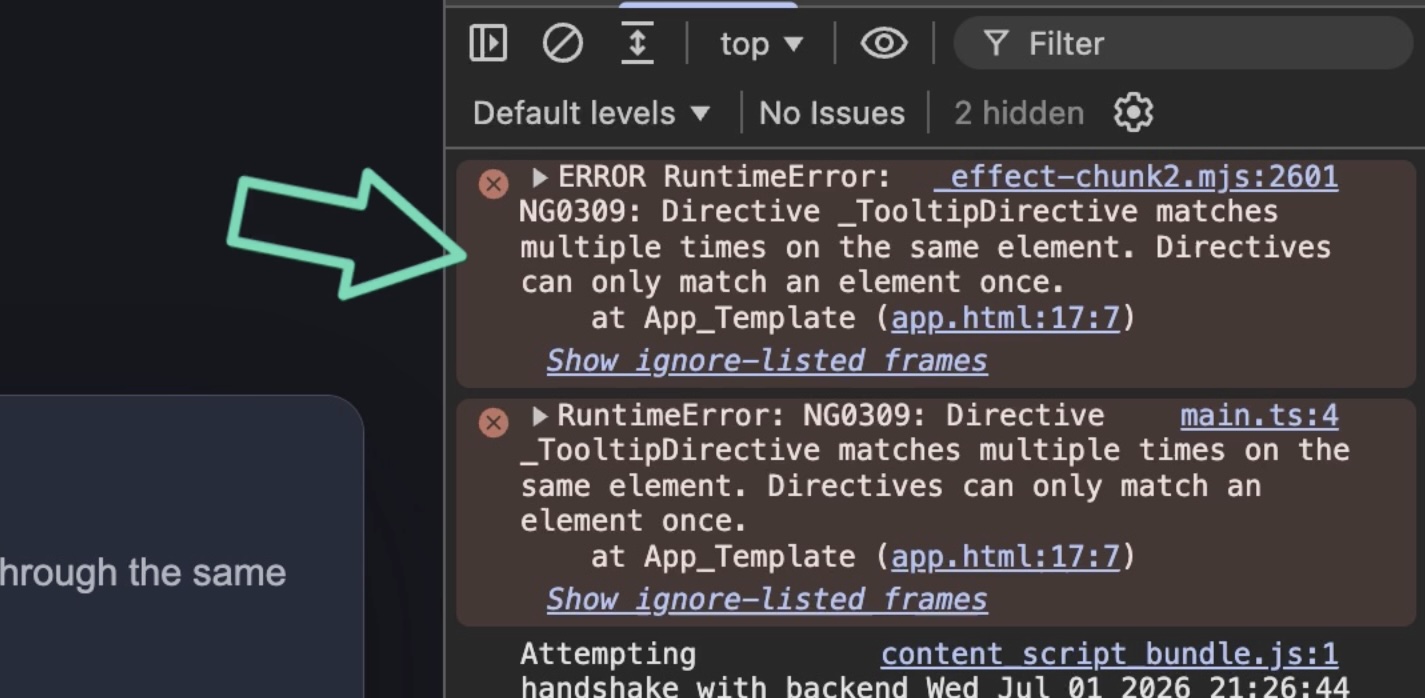
The problem was not the button itself.
The problem was the resolved directive tree.
Angular saw that appPressable brought in TooltipDirective.
It also saw that appCopyButton brought in TooltipDirective.
So from Angular’s point of view, the same directive was being matched more than once on the same element.
Conceptually, the composition looked like this:
button
  ├── appPressable
  │   └── TooltipDirective
  └── appCopyButton
      └── TooltipDirective
We were not trying to create two separate tooltips.
We were trying to compose two higher-level behaviors that happened to share one lower-level behavior.
That’s a common pattern, especially if you’re building reusable Angular libraries.
Angular 22 De-Duplicates Shared Host Directives
Angular 22 fixes this by de-duplicating shared host directives.
Now, when the same directive appears more than once in the resolved host directive tree, Angular can merge those matches into a single directive instance.
So instead of treating this as two separate tooltip directives, Angular recognizes that both composition paths are asking for the same directive.
Now the button works as expected:

- Hover shows “Copy invite link”
- Pressing changes the message to “Release to copy”
- Releasing and copying changes the message to “Copied!”
The code does not need to change.
The composition just works.
One Important Caveat: Aliases Still Matter
There is one detail worth calling out.
Both directives expose the tooltip message input using the same alias:
inputs: ['message: tooltip']
That matters.
Angular can merge duplicate host directive matches, but it still has to merge their input and output mappings.
So this is fine:
inputs: ['message: tooltip']
But you can’t do this in the other directive:
inputs: ['message: other-tooltip']
If one directive exposed the same input as tooltip and another exposed it as something else, Angular would not know which public API should win.
That’s when you can run into a conflicting host directive binding error.
So the rule is simple: If multiple directives reuse the same shared host directive and expose the same input or output, use the same alias.
Why This Makes hostDirectives More Practical
After upgrading to v22, this button can safely combine both higher-level behaviors.
Angular de-duplicates the shared host directive.
And the button gets tooltip behavior, press feedback, and clipboard copy behavior without a duplicate directive error.
That makes directive composition feel a lot more practical.
Get Ahead of Angular’s Next Shift
Angular’s newest APIs are changing the way we build.
If you’re ready to go deeper with one of the biggest shifts in modern Angular, my Signal Forms course will help you get comfortable with the new forms model.
You can access it either directly or through YouTube membership, whichever works best for you:
👉 Buy the course
👉 Get it with YouTube membership
Additional Resources
- The source code for this example
- Angular Directive Composition API
- The commit that made this possible
- NG8024: Conflicting Host Directive Binding
- My course “Angular Signal Forms: Build Modern Forms with Signals”
- My course “Angular: Styling Applications”
- My course “Angular in Practice: Zoneless Change Detection”