Angular 22: linkedSignal() Can Now Write Back to State
Angular's linkedSignal() just got a small upgrade with a big practical payoff. It can now read from larger signal state and write back to it with a custom setter, giving us a clean field-level API without creating disconnected duplicate state.
Note: At the time of writing, the feature you’re about to see is only available in Angular
22.1.0-next.0.
The Problem: Editing Nested Signal State
Let’s start with a simple profile settings screen:
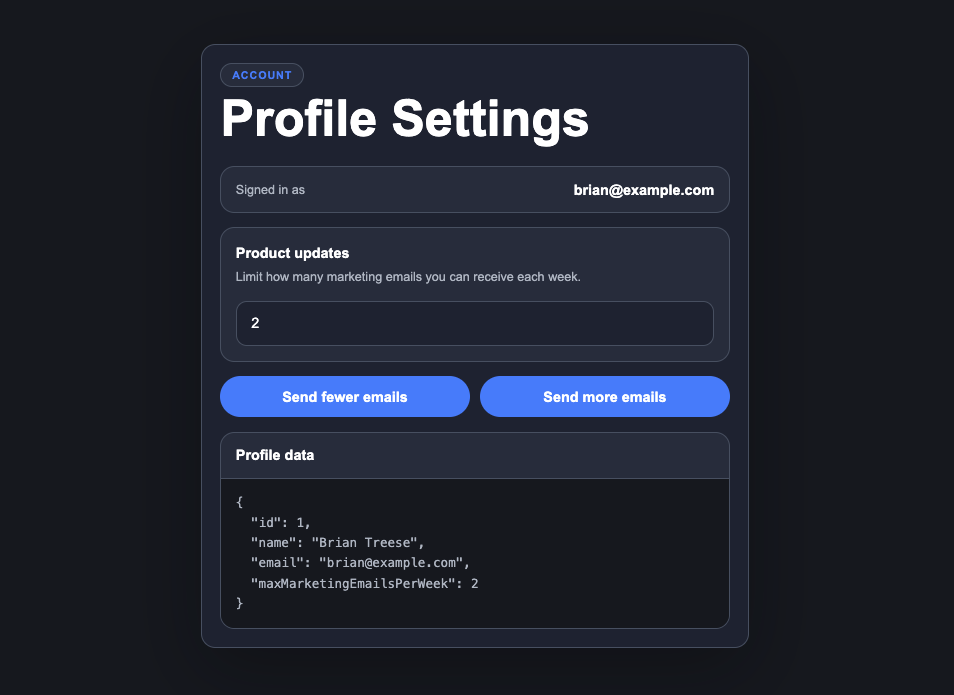
We have a signed-in user, and a product updates setting that controls how many marketing emails this user can receive each week.
In the template, we bind the input to a field-level signal maxMarketingEmailsPerWeek():
<input
  #emailLimit
  type="number"
  min="0"
  [value]="maxMarketingEmailsPerWeek()"
  (input)="setMaxMarketingEmailsPerWeek(emailLimit.value)" />
Then we have a couple of buttons that update that value from their own methods sendFewerEmails() and sendMoreEmails():
<button
  type="button"
  [disabled]="maxMarketingEmailsPerWeek() === 0"
  (click)="sendFewerEmails()">
  Send fewer emails
</button>

<button
  type="button"
  (click)="sendMoreEmails()">
  Send more emails
</button>
Nothing too unusual here.
But the important part is that this value does not live in its own isolated signal.
The actual source of truth is a larger profile object.
protected readonly profile = signal<UserProfile>({
  id: 1,
  name: 'Brian Treese',
  email: 'brian@example.com',
  maxMarketingEmailsPerWeek: 2,
});
A profile object like this might come from an API, a resource, a store, a parent component, or some other state layer.
We don’t always have a separate signal for every property.
Sometimes the UI needs to edit one field, while the real state is a larger object.
Before Angular 22: Reading Was Clean, Writing Wasn’t
Before this update, we could use linkedSignal() to read the field from the parent signal:
protected readonly maxMarketingEmailsPerWeek = linkedSignal(
  () => this.profile().maxMarketingEmailsPerWeek
);
This gives us a field-level signal for the maxMarketingEmailsPerWeek property.
So the template can read it directly:
[value]="maxMarketingEmailsPerWeek()"
But writing back to the parent profile signal still required a separate method.
First, the input handler received the raw DOM value as a string, converted it to a number, prevented negative values, and then called a updateMaxMarketingEmailsPerWeek() method:
protected setMaxMarketingEmailsPerWeek(value: string) {
  this.updateMaxMarketingEmailsPerWeek(Math.max(0, Number(value) || 0));
}
Then that method updated the parent profile signal:
protected updateMaxMarketingEmailsPerWeek(value: number) {
  this.profile.update(profile => ({
    ...profile,
    maxMarketingEmailsPerWeek: value,
  }));
}
The buttons needed to call the same method too:
protected sendFewerEmails() {
  this.updateMaxMarketingEmailsPerWeek(
    Math.max(0, this.maxMarketingEmailsPerWeek() - 1)
  );
}

protected sendMoreEmails() {
  this.updateMaxMarketingEmailsPerWeek(
    this.maxMarketingEmailsPerWeek() + 1
  );
}
This works fine.
But the code is more spread out than it needs to be.
The linked signal handles the read side, while the write-back logic lives somewhere else.
That’s the part Angular 22 lets us clean up.
Angular 22: Add a Custom set() to linkedSignal()
Now linkedSignal() can take a custom set function.
That means we can keep the read logic and write-back logic together:
protected readonly maxMarketingEmailsPerWeek = linkedSignal(
  () => this.profile().maxMarketingEmailsPerWeek,
  {
    set: value => {
      this.profile.update(profile => ({
        ...profile,
        maxMarketingEmailsPerWeek: value,
      }));
    },
  }
);
Now this linked signal knows how to read from the profile (which it already did):
() => this.profile().maxMarketingEmailsPerWeek
And it also knows how to write back to the profile:
set: value => {
  this.profile.update(profile => ({
    ...profile,
    maxMarketingEmailsPerWeek: value,
  }));
}
That’s the key idea.
The linked signal becomes a writable field-level API that is still backed by the larger profile object.
This is not a second source of truth and it’s not magic two-way binding.
It’s just an explicit write-back function for a focused piece of state.
Step 1: Use set() on the linkedSignal()
Now that the linked signal has custom write behavior, the input handler can be simplified.
Instead of calling the separate helper method, we can call set() directly on the linked signal.
Before:
protected setMaxMarketingEmailsPerWeek(value: string) {
  this.updateMaxMarketingEmailsPerWeek(Math.max(0, Number(value) || 0));
}
After:
protected setMaxMarketingEmailsPerWeek(value: string) {
  this.maxMarketingEmailsPerWeek.set(Math.max(0, Number(value) || 0));
}
The function still handles the DOM input conversion, but once we have the final value, we just set the field-level signal.
Because we added the custom setter, that value writes back to the full profile object.
Step 2: Use update() Too
This also works with update().
So the button methods can be simplified too.
Instead of this:
protected sendFewerEmails() {
  this.updateMaxMarketingEmailsPerWeek(
    Math.max(0, this.maxMarketingEmailsPerWeek() - 1)
  );
}

protected sendMoreEmails() {
  this.updateMaxMarketingEmailsPerWeek(
    this.maxMarketingEmailsPerWeek() + 1
  );
}
We can update the linked signal directly:
protected sendFewerEmails() {
  this.maxMarketingEmailsPerWeek.update(value => Math.max(0, value - 1));
}

protected sendMoreEmails() {
  this.maxMarketingEmailsPerWeek.update(value => value + 1);
}
This is the part I really like.
Both set() and update() flow through the custom setter, so they both write back to the parent profile signal.
update() is not bypassing the custom setter.
It calculates the next value, then sends that value through the same write-back path.
And now the old updateMaxMarketingEmailsPerWeek() helper method has no job.
Always a nice moment.
We can delete it.
The Final Result
After this change, the component is easier to reason about.
We have the source of truth:
protected readonly profile = signal<UserProfile>({
  id: 1,
  name: 'Brian Treese',
  email: 'brian@example.com',
  maxMarketingEmailsPerWeek: 2,
});
Then we have the field-level linked signal:
protected readonly maxMarketingEmailsPerWeek = linkedSignal(
  () => this.profile().maxMarketingEmailsPerWeek,
  {
    set: value => {
      this.profile.update(profile => ({
        ...profile,
        maxMarketingEmailsPerWeek: value,
      }));
    },
  }
);
And the UI actions can work directly with that field-level signal:
protected setMaxMarketingEmailsPerWeek(value: string) {
  this.maxMarketingEmailsPerWeek.set(Math.max(0, Number(value) || 0));
}

protected sendFewerEmails() {
  this.maxMarketingEmailsPerWeek.update(value => Math.max(0, value - 1));
}

protected sendMoreEmails() {
  this.maxMarketingEmailsPerWeek.update(value => value + 1);
}
The behavior is the same, but the state management is cleaner because the read and write behavior now live together.
Final Thoughts
This is a small API change, but it’s a practical improvement for real Angular state management.
Before, linkedSignal() gave us a clean way to read a value from larger state, but writing back to it still needed to happen somewhere else.
Now the linked signal can own both sides.
Get Ahead of Angular’s Next Shift
Angular’s newest APIs are changing the way we build.
If you’re ready to go deeper with one of the biggest shifts in modern Angular, my Signal Forms course will help you get comfortable with the new forms model.
You can access it either directly or through YouTube membership, whichever works best for you:
👉 Buy the course
👉 Get it with YouTube membership